Editor’s note: We know that the P99 CONF community loveshates latency, so we’re delighted that Pekka Enberg decided to write an entire book on it — and we’re proud to sponsor 3 chapters from that book.
Get the Latency book excerpt PDF
Also, Pekka recently shared key takeaways from that book in a masterclass on Building Low Latency Apps (now available on demand).
Let’s continue our Latency book excerpts with more from Pekka’s caching chapter. It’s reprinted here with permission of the publisher.
***
Cache coherency
Cache coherence means that multiple caches maintain a uniform view of the cached data. For example, in modern CPUs with multiple cores, each core maintains its own cache. When your program reads data from memory, that data is cached in the per-core CPU cache to speed up subsequent accesses. If another core reads the same data, it will pull that data into its cache, so it’s cached in two places.
However, the coherency issue arises when one of the cores writes to data cached by other cores. Only one core will see the latest value—the other cores see stale data, resulting in an incoherent system, unless there’s coordination between the different caches. That’s why modern multicore CPUs implement a cache coherency protocol, which ensures that caches don’t have stale data. Programs can keep reading and writing to memory as if there were no cache in between, from a correctness point of view. Of course, the cache coherence protocols that keep the caches up to date have a latency penalty because updates are now more expensive due to the coordination. That’s why, in many cases, distributed caches are incoherent, allowing stale reads.
Cache coherence refers to the mechanisms that ensure multiple caches have a consistent view of the data that is cached. For example, in multicore systems, each CPU core has its local cache to speed up memory accesses. Most CPUs today are cache-coherent, which means that when a program writes to memory, the CPU cores use a cache coherence protocol to ensure that data is up to date across all the caches. In other words, if two or more CPUs have data cached from the same memory region, a cache-coherent system ensures that when a write happens, every cache is either updated or invalidated, so programs never read stale data. CPUs coordinate cache coherence using a protocol such as MESI.
The MESI protocol defines four states for each cache line (for example, a 64-byte block of cached memory):
- Modified (M) means that a single cache has a valid and modified copy of data. The CPU is free to change the cache line further.
- Exclusive (E) means that a single cache has a valid copy that isn’t modified and matches the contents of the main memory. Modifying the cache line puts it into the modified (M) state.
- Shared (S) means that one more cache has a valid, unmodified copy of data that matches the contents of the main memory.
- Invalid (I) means a cache line is either invalid or absent.
When a program attempts to read from the main memory, the CPU checks its local caches to see if the data is there. If the cache line is in a modified, exclusive, or shared state, the CPU reads from the cache. If the cache line is invalid, the CPU reads from the main memory, updating the cache line. The cache line is put in the exclusive state if no other cache has the same data cached; otherwise, the cache line is set to the shared state.
The CPU can write to a cache line when it is in a modified state. If a cache line is in an exclusive state, the CPU can change the state to modified, as per MOSI protocol, and write to it. However, if the cache line is in a shared state, the cache coherence protocol needs to get the cache line to an exclusive state. The CPU does that by invalidating all the other copies of the cache lines, putting them into an invalid state, and then making its cache line exclusive. If a cache line the CPU needs to write to is in invalid state, the cache coherence protocol fetches it from the main memory, putting it in either exclusive or shared state.
In contrast to cache-coherent systems, a cache-incoherent system does not guarantee coherence. Instead, cache incoherence allows for reading stale data from the caches, which is efficient and low latency for applications that can live with it because it requires no coordination between the caches. In practice, many ad hoc application-level caching solutions tend to be cache incoherent because implementing cache coherence is hard.
Consistency models determine how concurrent operations on data are ordered. It’s a topic we discussed in detail in chapter 4 on replication, where we discussed the pros and cons of different consistency models. In short, strong consistency (linearizability) provides the illusion that there is only a single copy of the data, while weak consistency (eventual consistency) allows for multiple copies to diverge.
Coherence guarantees that all caches have the same data, but it gives no guarantees on the ordering of operations on the data. In other words, cache coherence does not guarantee strong consistency. Furthermore, CPUs implement cache coherence protocols that are more sophisticated than MESI. For example, CPUs that perform out-of-order execution delay writes using store buffers and also delay cache line invalidation with invalidation queues, which means two CPUs can see different values in the cache temporarily.
Cache hit ratio
A cache makes things run faster, providing a temporary copy of essential data with faster access latency than the primary data storage. As we have already discussed, you can use a key–value store, such as Redis, to cache query results you’d otherwise have to fetch from a database server, such as MySQL or Postgres. However, you can’t generally cache all your data (if you could, you would probably be using replication), so how can you maximize your performance with the constraint that your cache is smaller than the dataset you’re working with? The answer is to maximize the cache hit ratio.
The cache hit ratio is a number that describes the ratio between your cache hits and total cache accesses. Usually, you calculate the cache hit ratio as the number of cache hits divided by the sum of cache hits and misses, as shown in the following equation:
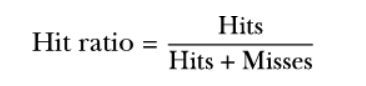
The cache hit ratio tells you how effective your cache is for a given workload. The higher the cache hit ratio, the more your workload is served from your cache and, hopefully, the faster it is. A cache hit ratio of 100% means all your data accesses were from the cache, and a hit ratio of 0% means none of them were, so the data had to be retrieved from the primary storage. Sometimes, people also talk about the cache miss ratio, which is the inverse of the cache hit ratio. A 100% cache miss ratio is the same as a 0% cache hit ratio, meaning everything is retrieved from primary storage. A cache miss ratio of 0%, on the other hand, implies a cache hit ratio of 100%, where everything is served from the cache.
Pattern: Maximize cache hit ratio
The cache hit ratio is a measure that tells you the ratio of cache hits versus all cache accesses, including cache misses. When you are optimizing for low latency with a cache, maximizing the cache hit ratio is crucial because primary storage access typically has a large latency penalty that you are trying to avoid with caching. For example, you may be caching data in a key–value store that is both close to the application and also has fast lookup times. In contrast, the primary storage may be a database running in a cloud server, which can be far away and slow to access.
The key mechanisms for improving the cache hit ratio are making the cache large enough and choosing the right cache replacement policy for your application workload. If your application has a working set of 10 MB, but you only have 1 MB of cache, you will have a lower cache hit ratio, resulting in worse performance. However, if you can make the cache as large as the working set by either making the cache larger or reducing the size of your working set, you can effectively hide the latency of the backing store, such as a database, and make your application run at cache speed. Similarly, if you pick a cache replacement policy that doesn’t match your workload, you may end up throwing away entries only to fetch them again from the backing store, resulting in suboptimal performance.
You can also increase the cache hit ratio by controlling your application’s data access patterns. For example, suppose your application needs to perform multiple passes over a dataset. In that case, it may be better to accomplish all the passes on the same batch of data in the cache, from a cache-utilization point of view. For example, suppose you have a 100 GB dataset but only 100 MB of cache. In that case, you should look into ways of performing all the passes in 100 MB chunks, which will increase the cache hit ratio, because after the first pass, all of the data for the batch is in the cache, whereas running all the passes on the whole dataset would result in data never being in the cache.
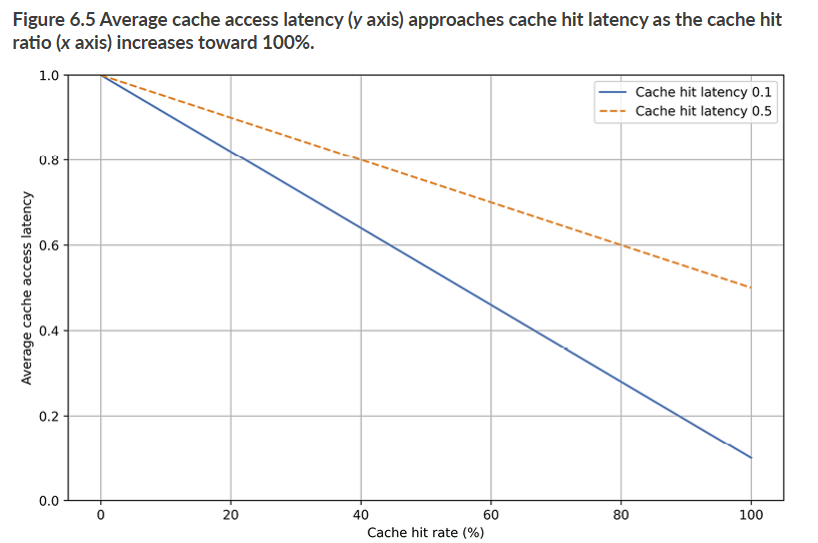
Figure 6.5 plots average cache access latency (y axis) versus cache hit ratio (x axis). In the plot, the cache miss latency is assumed to be 1 second, and the plots show two lines with a cache hit latency of 0.1 and 0.5 seconds. As you can see, average cache latency starts at cache miss latency when the hit ratio is 0% and linearly approaches the cache hit latency as the hit ratio moves toward 100%. For example, if you have a hit ratio of 80%, the average access latency with a cache hit latency of 0.5 seconds is 0.6 seconds. With a cache hit latency of 0.1 seconds, the average cache access latency is 0.3 seconds. If you are using caching to achieve low latency, you, therefore, need to ensure that the cache hit latency is as low as possible and that you have as high a hit ratio as possible.
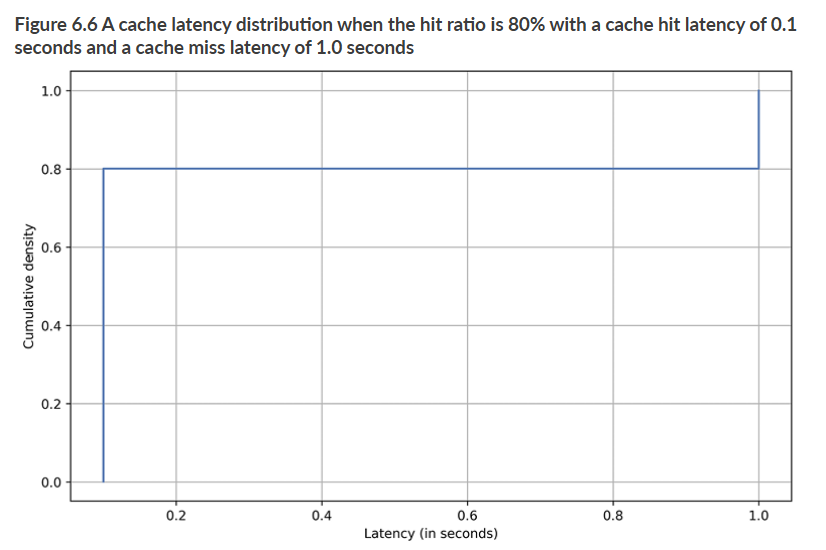
However, as you have already learned, the average latency is essentially the inverse of the throughput. It’s worth reminding ourselves that the cache miss latency can become a problem even with a high cache hit ratio. Figure 6.6 shows an example cache access latency distribution with an 80% hit ratio where the cache hit latency is 0.1 seconds and the cache miss latency is 1.0 seconds. As you can see, it has a heavy tail latency, which many requests will experience. It is sometimes hard to ensure caching is a low-latency solution unless you can also drive down the cost of cache misses.
One way to improve the cache hit ratio is to think of it from the perspective of the working set, which is the dataset an application needs to perform its function at a particular time. The working set is often smaller than the total dataset the application can access, and it can change over time. For example, if we return to the e-commerce example, you may have a product catalog in the tens or hundreds of gigabytes. Still, your users are browsing just the products on the front page or ones that have become popular. That set of frequently accessed products could be your application’s working set. Similarly, in a social media application, some posts may have become extremely popular and are, therefore, accessed frequently, but with a heavy tail of less popular posts that are rarely accessed. The set of posts accessed during a particular period would be the working set.
When you know the working set of your application, it’s essential to try to fit that set into your cache because it will drive up the cache hit ratio. Usually, you do this by making the cache as big as the working set and ensuring that the cache replacement policy, which we’ll discuss shortly, matches your workload. For example, keeping the most frequently used items in your cache can be a good cache replacement policy if your working set is pretty stable. Still, it can be suboptimal if the working set can dramatically change because you’ll end up caching values that are not useful anymore. Overall, when optimizing for low latency, try to drive your cache hit ratio as high as possible based on your application’s working set.
***
To keep reading, download the 3-chapter Latency excerpt free from ScyllaDB or purchase the complete book from Manning.